

Cumulus Options
Options to Add Functionality to Cumulus
The Canto Cumulus Suite has a number of add-ons/plug-ins or Options available for purchase that enhance the functionality of Workgroup and Enterprise editions. See also Web/Vid/Phone Apps for specific applications and filters for the web, video and smartphones.
Cumulus Sites | RoboFlow | Web Client | VideoSuite | Email Cataloger | Usage Statistics & Reports | Extended packs for: Office, PDF and InDesign InDesign Companion | QXP Companion | Upgrade modules
Plus Canto offer Additional Options for specialised workflow and integration such as Roles, LDAP Support, Oracle Connectivity, OpenText Bridge and more - see the tab link below. There are also a number of 3rd Party plugins available including locally developed solutions - see the tab link below.
Cumulus Sites
[Included with Enterprise edition - replaces Web Publisher Pro]
Cumulus Sites is the ideal Option to publish and market your digital assets on dynamically generated Web pages to the Web. Users with a standard Web browser can comfortably search for cataloged assets, convert them as required and collect them into a collection basket. They can choose their preferred method of asset delivery - download, email, or DVD shipment - in the built-in ordering system. Appropriate access rights are granted with the built-in user management. Cumulus Sites is an ideal Sales and Marketing tool to support the company-wide workflow and the ideal solution to provide production data to customers.
See DataBasics online demo server and Canto's Cumulus Sites Flash movie.
RoboFlow
RoboFlow was originally developed by Amides for customers who want to develop an automated workflow in Cumulus to perform a series of actions and functions across the database. RoboFlow is a Server Side Automation Tool for Canto Cumulus 8 and goes far beyond the automatic cataloging of assets. Preconfigured out-of-the-box and installed in a couple of minutes, deploying RoboFlow is easy and gets you up and running in no time.
See the datasheet (pdf) and the YouTube how-to video 'quickies' on setting up, imports, triggers, hot folders and more!
Web Client
[Included in Enterprise edition - formerly Internet Client Pro]
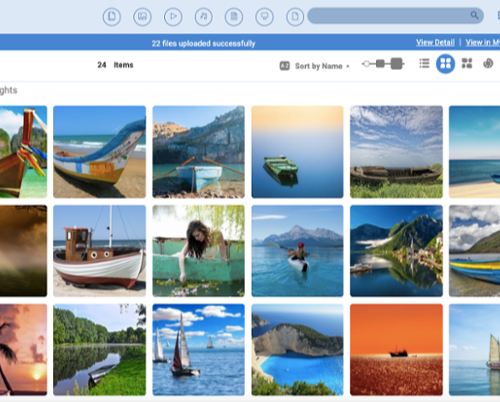
Cumulus Web Client offers read/write access to Cumulus for metadata edits and asset uploads and downloads - includes a number of improvements and additions specifically designed for use with Cumulus 8Servers:
- Built-in image editing - create asset variations over the Web.
- Report view - See a scrolling list of metadata that includes thumbnails.
- Thumbnail size slider - Resize thumbnails using an interactive slider.
- User live filter - Focus on certain asset formats, statuses or any other criteria.
Even better, user actions such as downloads and previews etc. are tracked so you'll know which assets are most popular with Web users.
More info online.
Video Suite
Find, manage and stream entire videos or individual shots.
The Cumulus Video Suite enables Cumulus Enterprise or Workgroup servers to manage video files as well as individual shots of a video. Due to an award winning shot boundary detection technology Video Suite can automatically create records, previews and thumbnails for each shot in the video, which then can be annotated with additional metadata.
Users can preview videos and shots directly in Cumulus and also edit and view the metadata of each shot. This substantially simplifies the searching and accessing of specific parts of a video.
More details in the datasheet(pdf)
Usage Statistics and Reports
Create automated graphical and textual reports - each well suited for different purposes - to help you value assets, fine-tune Cumulus, and plan for the future.
The Reporting module for Cumulus 8 enables you to:
Determine which assets are most popular - and which are doing you no good.
See the search terms used in your catalogs, so you can perfect your metadata, and
Value your collections and Cumulus use, so you make better purchase decisions.
More details in the datasheet (pdf).
Email Cataloguing
Email Cataloging is much more than just another way to get files into Cumulus:
Catalog files using smart phones, security cameras or other remote devices.
Publish email addresses anyone can use to securely send files to your organisation.
Archive inbound and outbound email for easy searching and compliance.
More details in the datasheet(pdf)
Extended Packs for PDF, Office and InDesign
Archive and manage individual pages contained within whole PDF, Office and InDesign documents automatically.
Extended Packs are add-ons to Cumulus 8 that each offer a different set of enhanced capabilities, including:
Per-page file handing and metadata management for PDF, PowerPoint, InDesign and QuarkXPress documents - find pages and slides, not just complete files.
On-the-fly creation of PowerPoint presentations based on cataloged images and slides - even over the Web.
Deconstruct files - track and find which documents contain which assets, and much more!
Users can subsequently search, view and browse individual pages of these compound documents.
More details in the datasheet(pdf)
InDesign Companion
Make Cumulus and InDesign work as one, and get more out of both programs.
Designers can drag and drop Cumulus cataloged images right into InDesign documents. Completed documents can be cataloged into Cumulus directly, and you can even have Cumulus create a PDF version of the document on the fly - perfect for easy approvals. A single menu enables InDesign artists to access Cumulus assets without the need for Cumulus client software. Finding files is fast, and drag and drop makes file placement easy. Catalog completed documents back into Cumulus from the same menu - easy!
More details in the datasheet(pdf)
QXP Companion
Canto's QXP Companion XTension for QuarkXPress provides a convenient palette window interface to Cumulus catalogs.
The relations Cumulus establishes between your layouts and page elements enable you to easily use one to find the other. For example, quickly find all layouts that include a certain file or find all files that are included in certain layouts. But text, images and layouts are not the only things supported by this integration. Composition Zones and Job Jackets also can be cataloged and managed in Cumulus. Find the Job Jacket you need, and easily create a compliant QuarkXPress project.
More details in the datasheet (pdf)
Upgrade Modules
Upgrade modules for live filtering & permissions management, auto-cataloging, Oracle database mirroring and more.
Power features from Cumulus Enterprise add flexibility and value to Cumulus Entry and Workgroup. Upgrade Modules expand the capabilities with:
Real-time, rules-based permissions and granular access controls,
Groups-based administration for easier, roles-based permissions management,
Advanced capabilities for project management, custom tabs, autocataloging,
More details in the datasheet (pdf)
More Canto Options, Addons and Plugins...
Contact us for more info about these Options.
Sites Community
Sites Community was developed by Canto to enable per-asset discussions within Cumulus Sites running on any Cumulus 8.5 Server. A single Community License is all that's required for unlimited use on a single Sites instance - it enables tagging and commenting for improved collaboration. Community users have the ability to set ratings, assign categories, set up discussion threads and more - all with a web browser.
Roles
Roles are groups that share permissions. When a user is added to the group, that user inherits the group's permissions. Administrators save time by making permissions changes to the role, which affects all assigned users at once.
Departments
Enables Cumulus administrators to "deputise" other users to perform user management functions for their departments, such as creating new users and roles, and assigning permissions. (Requires "Roles" addon and Cumulus 8.5 Server.
Autocataloging via AXR
Enables users to create as many custom category tabs as they need, and to search within all category metadatato find certain categories. Combined, these capabilities make categories suitable for project management in addition to their typical use. Includes: Search Category Metadata, Reduce Category Tree to "found" Categories Only, Create Custom Master Categories.
Extended LDAP support
Offers access to all LDAP fields from within Cumulus, and enables Cumulus administrators to map Cumulus user accounts and roles to LDAP accounts and groups, avoiding the need to manage user accounts on two systems. (Requires "Roles" add-on.
Extended Permissions
Offers offers real-time, rules-based permissions that can change based on dynamic circumstances such as workflow approvals, embargo dates or other factors. Individual record/category permissions enable users to determine who sees what on a per-asset record and per-category level. Field-specific permissions can restrict the editing of certain fields to only chosen individuals or roles. Includes: Live Filtering, Individual Record/Category Permissions, Permission to Edit Field Values.
Extended Categories
Enables users to create as many custom category tabs as they need, and to search within all category metadata to find certain categories. Combined, these capabilities make categories suitable for project management in addition to their typical use. Includes: Search Category Metadata, Reduce Category Tree to "found" Categories Only, Create Custom Master Categories.
Oracle Connectivity
Enables Cumulus to mirror catalog metadata to Oracle databases. The metadata can be queried from within Oracle, and because the metadata is stored in an Oracle system (in addition to Cumulus), corporate compliance requirements that mandate the use of Oracle are met.
Open Text Bridge
Integrates Cumulus with the Open Text Web Site Management Server to provide single-portal file access that works across your organisation; dynamic access permissions and version control for any file format, controlled file sharing, and more. More in the datasheet (pdf). Contact DataBasics for version compatibility information.
3rd Party Partner Plug-Ins
Many Canto Partners have used the Cumulus open platform to develop add-ons and plug-ins that extend the system's functionality even further and provide deep integration with your custom environment.
AutoCataloging and Workflow - Amides
Amides product RoboFlow now one of Canto Options - see above.
Email Ordering, ListSearch Addons - Heymann
Heymann Consulting products include:
- Email Order System Pro (EOSP) and for Sites
- ListSearch 8 EJaP
Metadata Prefiller and Web Uploads - interaktion
interaktion products include:
- iPrefillerPro
- iAsset Contributor
Video Editor and Cumulus for Smartphones - Vitras
Vitras GmbH products include:
- Video Remixer: video editing inside Cumulus
- SuduS: Cumulus Client for iPhone/iPad, Blackberry and Android
Web and eCommerce Modules - Modula4
Modula4 products include:
- ImageSorter and ImageSearch
- Video Module
Sites Zoom and Pan - Aimtec
Aimtec products include:
- ZoomA