

DataBasics DAM and Metadata

C8

Distributor of creative business solutions.                                               Home | About Us | Contact | Sitemap 


List of Suppliers:
- Equilibrium
- HELIOS
- Canto Cumulus
  : Single User
  : Cumulus Overview
  : Cumulus Options
  : Customer Support
  : Cumulus Training
  : HOT Info! & Press
  : Client Stories
  : DAM & Metadata Info
  : Modula4 Add-ons

- Dynagram
- Farrukh
- Adstream
- SeeFile
- Printable


Resellers/Integrators List
News & Events Index
Free Seminars
Free Demos
Free White Papers

Business Solutions:
- Digital Asset Mgmt
- Creative Solutions
- PDF Workflow
- Digital Distribution
- Prepress & Printing
- Document/Image Mgmt

GASAA
GASAA Major Sponsor

PODi
PODi Member 2008-9

Adobe
Adobe Bronze Partner

Digital Asset Management and Metadata

Digital asset management systems were developed to manage multimedia eg images & videos, and now rich media digital assets in widely different types, formats and sizes, including PDFs, MS Office documents, and any file that is considered to be a 'digital asset'. A DAM system has been defined as 'software to build a consistent repository of creative assets' - Wikipedia identifies DAM as "a business strategy because managing image, video and other media assets presents unique challenges and requires solutions designed specifically to streamline the acquisition, storage and retrieval of digital media". These definitions are based on two vital elements that a DAM system must provide:

  • controlled creation & capture of asset metadata
  • efficient front-end workflow management.
  • For a good overview of digital asset management see Jennifer Neumann's DAMAP 05 (zip) and DAMAP 06 (pdf) presentations.

    Metadata is the descriptive information eg name, format, size etc that exists for a file or digital asset such as an image or a PDF. You may want to use this information for search & retrieval, re-use, recordkeeping, and/or archival purposes. This information is usually embedded by the creating application within the asset file. It can be retrieved for indexing and auditing using appropriate software tools but each application has its own way of recording and describing that information.

    Australian AGLS Metadata Standard

    In order to better control the creation of quality metadata, the Australian Government has adopted the international Dublin Core Metadata Standard for Internet resource discovery (AGLS Metadata Element Set).

    Known as AGLS (Australian Government Locator Service), it is mandatory for agencies to use a minimum set of 5 of the 19 AGLS descriptive elements, eg Creator, Date etc. to create metadata compliant with the Australian Standard AS 5044. However, Australian Government agencies are required to use additional elements to meet their Online Strategy obligations and to improve the visibility and accessibility of their web-based services and information. Thus Type and Description are mandatory and Publisher, Audience, Coverage and Language are also mandatory depending on the resource's content. In addition, Function must be used for description of collection level resources and services.

    Each State has adopted the AGLS standard though not all have made it mandatory and there is a Guideline available from the relevant State agency detailing requirements and providing recommendations for compliance. There are also adaptations of the Metadata Standard for educational institutions eg EdNA, for spatial data eg ANZLIC, for recordkeeping activities, RKMS, and more.

    Metadata, Workflow and Cumulus

    Quality metadata for online access and retrieval requires workflow management for all contributors to the assets repository, as well as the consistent use of asset identifiers and keywords using AGLS.

    The Cumulus application is a digital asset management solution with the following features:
    * Cumulus is designed for smooth and efficient workflow linked to superior cataloguing, indexing and retrieval tools for 100+ asset file formats - from tiffs to mpegs, pdfs to Word documents and including IPTC Core schema and XMP.
    * Cumulus is Macintosh OSX, Windows, Linux/Unix compliant so contributors on Macs or Windows etc have full access to Cumulus cataloguing, search & retrieval functions resulting in more efficient workflow.
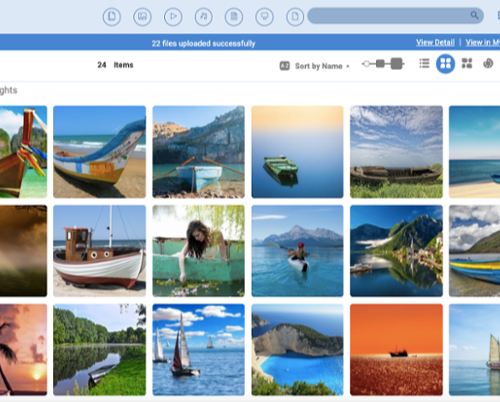
    * The interface is visual so assets are readily identified by thumbnail or preview with associated metadata visible in an information window.
    * Metadata capture is automatic when cataloguing any file that contains embedded metadata. That metadata can be mapped to AGLS fields and additional customisable fields can be added manually where required.
    * Records with thumbnails are exportable as HTML files (Web pages) for remote visual display; metadata can be exported as XML files for harvesting.
    * Assets may be moved via Cumulus and source locations automatically updated.
    * Digital rights and user access privileges can be easily managed by the Cumulus server administration which also provides LDAP user authentication support.

    Refer Canto Cumulus product information for technical details and additional Options.

    Cumulus in Brief

  • Cumulus runs on all platforms for total user access and efficient workflow
  • Visual display and easy interface improves user productivity and workflow
  • IPTC Core and XMP 4.0 metadata-compliant and writes back IPTC/XMP metadata into the asset.
  • Automatic metadata capture
  • Metadata fields re-mappable and customisable for AGLS compliance
  • Export catalogue collections as web pages
  • Export metadata in XML format
  • Move assets & update locations
  • User privilege administration & digital rights management.
  • * See details of Cumulus metadata database engine online.

    Case Studies

    * James Cook University: JCU Picture Archive Daintree Collection (also accessible via the Picture Australia gateway) - case study details online in JCU success story (html). See also the Quicktime movie of setting up Dublin Core metadata in Cumulus.

    Metadata Add-ons and Cumulus Support

  • Cumulus addon iPrefillerPro enables the controlled entry of metadata ensuring no blank fields: see the datasheet (pdf) - view the demo (Flash)!
  • Cumulus metadata support through file filters and asset stores - metadata support chart (pdf)
  • * Pound Hill's MetaGrove product for XMP metadata - toolkit plugin fo Adobe Creative Suite: overview & workflow diagram (pdf) and online tutorial (html).
  • Quick Links & References

  • DAMAP 2006 Conference paper on Dublin Core for digital assets: Metadata for Digital Assets Overview (pdf) by Linda Rouse.
  • Australian Government Locator Service - known as AGLS
  • AGLS Metadata Element Set
  • Australian Government Implementation Manual for AGLS Metadata.
  • Dublin Core Metadata Initiative - for interoperable online metadata standards.
  • Background information on IPTC Core Schema and XMP for digital images see Cover Pages for details.
  • Download the free White Paper on metadata (pdf) by Geofrey Bock, Designing Metadata: An Implementer's Guide for Organizing and Using Digital Assets.
  • Refer DataBasics Canto Cumulus product information pages for Cumulus technical details and additional Options.

    Top
    Home |  News & Events |  Resellers & Integrators |  Suppliers
    About us |  Contact |  Sitemap

    Copyright © 1998-2010 DataBasics Pty Ltd. Privacy & Disclaimer
    Email info@databasics.com.au URL: http://www.databasics.com.au/