

Cumulus Web, Video, iPad & Smartphone Apps
Canto and their 3rd Party partners provide a number of access points to the Cumulus catalogs - the standard desktop Client that comes with the entry server, two web interfaces, a video management tool and a mobile Client for iPad and smartphone access.
Canto Web and Video Options
Workgroup with Cumulus Sites
Cumulus Sites is the ideal Option to publish and market your digital assets on dynamically generated Web pages to the Web. Users with a standard Web browser can comfortably search for cataloged assets, convert them as required and collect them into a collection basket. They can choose their preferred method of asset delivery - download, email, or CD ROM shipment - in the built-in ordering system. Appropriate access rights are granted with the built-in user management. Cumulus Sites is an ideal Sales and Marketing tool to support the company-wide workflow and the ideal solution to provide production data to customers.
See the Cumulus Sites Flash movie, online demo and datasheet (pdf).
Workgroup with Web Client
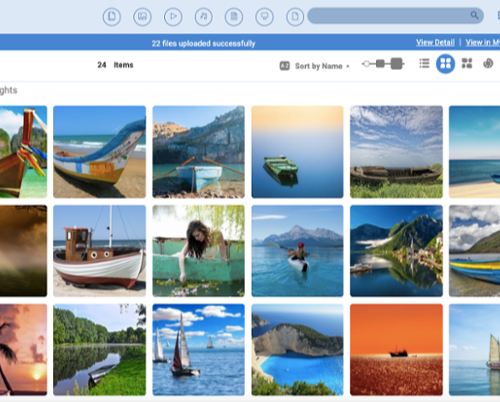
Cumulus Web Client offers read/write access to Cumulus for metadata edits and asset uploads and downloads. It contains
- Built-in image editing - create asset variations over the Web.
- Report view - See a scrolling list of metadata that includes thumbnails.
- Thumbnail size slider - Resize thumbnails using an interactive slider.
- User live filter - Focus on certain asset formats, statuses or any other criteria.
Even better, user actions, such as downloads and previews, etc. are tracked by Cumulus 8.1, so you'll know which assets are most popular with Web users. More info online.
Video Suite Option
Find, manage and stream entire videos or individual shots.
The Cumulus Video Suite enables Cumulus Enterprise or Workgroup servers to manage video files as well as individual shots of a video. Due to an award winning shot boundary detection technology Video Suite can automatically create records, previews and thumbnails for each shot in the video, which then can be annotated with additional metadata. Cumulus Video Suite also supports streaming for viewing video files and individual shots over the Internet.
Users can preview videos and shots directly in Cumulus and also edit and view the metadata of each shot. This substantially simplifies the searching and accessing of specific parts of a video.
More details in the datasheet (pdf)
3rd Party Web, iPhone-iPad/Smartphones, Video Plug-Ins
Web Zoom and Pan - Aimtec
- ZoomA: built for Cumulus Sites and web client, ZoomA adds hi-res zoom n pan to all files in Cumulus Sites - PDFs as well as images files. See the online demos.
Image Sorter and Video Modules - Modula4
- ImageSorter: this addon groups pictures according to color, brightness and visual content. That way you'll get a quick overview of the eligible photos. The Eagle eye function allows you a clear overview and to zoom. See the online demo.
- Video Module: enables easy and secure presentation of your videos as video streams on the Net. The Video Module converts video files for the Adobe Flash Streaming Server. See datasheet (pdf) and online demo.
Web Asset Uploader - interaktion
- iAsset Contributor: enables you to upload assets either to Cumulus singly or in bulk as a zipped file via a web interface using a form that forces the user to add appropriate metadata with the upload. See screenshot.
Video Editor and iPhone-iPad/Smartphone Client - Vitras
- Video Remixer: enables video editing inside Cumulus supports all popular file formats (avi, flv, mov, mpeg, ogg) with a simple DragnDrop interface. Includes the functions to Trim/Cut, Merge and Convert. See the datasheet (pdf).
- SuduS: this is a Cumulus Client for Apple's iPhone/iPad, Blackberry and Android that gives you access to multiple Cumulus servers. Works via WiFi, 3G or GPRS. SuduS fully supports Multiple catalogs, Category view, Calender view, QuickSearch, List and Thumbnail views, Preview including zoom, Editing metadata, Saving images to local photo albums. See the datasheet (pdf) and videos on YouTube.